
Superb quality and spec AB-Com PULSe 4K SE. Crazy offer! Only £99! FREE UK DELIVERY! 4K UHD, Enigma 2, Multiboot 4 images & more!...
Superb quality and spec AB-Com PULSe 4K Rev II Twin Satellite tuner only £149! FREE UK DELIVERY! 4K UHD, Enigma 2, SATA HDD facility, Multiboot 4 images & more!...
You are using an out of date browser. It may not display this or other websites correctly.
You should upgrade or use an alternative browser.
You should upgrade or use an alternative browser.
[SF8008] samba again not working
- Thread starter bellejt
- Start date


Willo3092
ViX Beta Tester
Have you tried installing via putty?
Code:
opkg update
Code:
opkg install packagegroup-base-smbfs-server
ccs
ViX Beta Tester
- Joined
- Sep 6, 2014
- Messages
- 5,836
- Reaction score
- 5
- Points
- 0
I've reflashed 6.1.003 a number times recently on 2 different boxes, restoring settings from 6.0.008 without any problems.
Try reflashing but don't restore anything. Get the network up and running, opkg update, and then try to start samba.
If it works, select and restore your setting/plugins from backupmanager.
Try reflashing but don't restore anything. Get the network up and running, opkg update, and then try to start samba.
If it works, select and restore your setting/plugins from backupmanager.

bellejt
Forum Supporter

- Joined
- Dec 24, 2013
- Messages
- 2,251
- Reaction score
- 53
- Points
- 48
- Age
- 65
updated the duo2 and there it was working without problems with a full restore .There was a problem on updating from a few images ago but seems not to have been solved. Should look to the procedure but think it was making backup and updating again

adm
Forum Supporter
does not solve the problem .Why is it so hard to keep it working on updates without hassel ?
I had problems getting Samba working again on version 6.0 (and in the past with a few couch upgrades) but this time around it was OK with with 6.1 on both of my boxes.
In the past what has mostly worked i(but not every time) is a couch update without a restore of settings and plugins. After getting your network up and running - starting SAMBA which will result in a download and a reboot of your box. Then restore settings from the backup manager.
If you go down this route perhaps check your menu ->timers -> power timers which sometimes can get duplicated if messing around to try and get something working (assuming that you actually use power timers)
I had the same problem few days back but on a diffrent image, what I noticed is that during flashing one needs to select under NETWORK - DHCP and not interface, I found that worked beacuse previous to that I selected 'Interface' and from then onwards it went wrong. I could be wrong but it worked for me
ccs
ViX Beta Tester
- Joined
- Sep 6, 2014
- Messages
- 5,836
- Reaction score
- 5
- Points
- 0
Try reflashing 6.1.003 but don't restore anything. Get the network up and running, opkg update, and then try to start samba.
If it works, select and restore your setting/plugins from backupmanager.
Worked first time on my ET10K.
Uninstalling and re-installing came back after all the reboots as "stopped", but the green button set the service "running" again.
Last edited:
ccs
ViX Beta Tester
- Joined
- Sep 6, 2014
- Messages
- 5,836
- Reaction score
- 5
- Points
- 0
Using 7-Zip on a pc, I can view a settings backup without unpacking it. (Open archive.)
vix-rel-6.0.008-20220328-2015.tar.gz\vix-rel-6.0.008-20220328-2015.tar\tmp\ includes ExtrainstalledPlugins, which should contain just the following line in bold for Samba....
vix-rel-6.0.008-20220328-2015.tar.gz\vix-rel-6.0.008-20220328-2015.tar\tmp\ includes ExtrainstalledPlugins, which should contain just the following line in bold for Samba....
Code:
enigma2-plugin-extensions-sundtekcontrolcenter
packagegroup-base-nfs
enigma2-plugin-drivers-exfat
[B]packagegroup-base-smbfs-server[/B]
run-postinsts
bellejt
Forum Supporter
- Joined
- Dec 24, 2013
- Messages
- 2,251
- Reaction score
- 53
- Points
- 48
- Age
- 65
compared the samba from duo2 with octagon and on octagon in smb-user.conf the following is missing :
[global]
# include = /etc/samba/distro/smb-secure.conf
disable netbios = No
Solution : init 4
Deleted all in dir samba and copied files from duo 2
Init 6
and samba is working normal after restart
[global]
# include = /etc/samba/distro/smb-secure.conf
disable netbios = No
Solution : init 4
Deleted all in dir samba and copied files from duo 2
Init 6
and samba is working normal after restart
ccs
ViX Beta Tester
- Joined
- Sep 6, 2014
- Messages
- 5,836
- Reaction score
- 5
- Points
- 0
That doesn't really make sense, "disable netbios = No" is an optional parameter, so including it shouldn't make any difference to getting it installed.
And it doesn't really explain why a flash without restoring settings/plugins didn't work either.
Was that the only difference between /etc/samba on the 2 boxes?
And it doesn't really explain why a flash without restoring settings/plugins didn't work either.
Was that the only difference between /etc/samba on the 2 boxes?
ccs
ViX Beta Tester
- Joined
- Sep 6, 2014
- Messages
- 5,836
- Reaction score
- 5
- Points
- 0
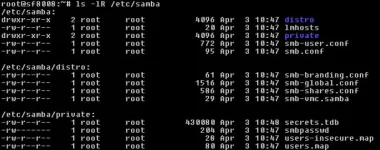
That's a shame, this is what /etc/samba should look like, all the directories/files should have dates similar to the release, apart from those I've highlighted.
I'll remove the option and see what happens later.
Code:
root@et10000:~# ls -lR /etc/samba
/etc/samba:
drwxr-xr-x    2 root     root           528 Mar 27 22:20 distro
-rw-r--r--    1 root     root            20 Mar 27 22:20 lmhosts
[B]drwxr-xr-x    2 root     root           376 Mar 28 21:36 private[/B]
[B]-rw-r--r--    1 root     root           772 Dec 31  2020 smb-user.conf[/B] #User changes should only be added here.
-rw-r--r--    1 root     root            95 Mar 27 22:20 smb.conf

/etc/samba/distro:
-rw-r--r--    1 root     root            61 Mar 27 22:20 smb-branding.conf
-rw-r--r--    1 root     root          1516 Mar 27 22:20 smb-global.conf
-rw-r--r--    1 root     root           586 Mar 27 22:20 smb-shares.conf
lrwxrwxrwx    1 root     root            13 Mar 27 22:20 smb-vmc.conf -> smb-vmc.samba
-rw-r--r--    1 root     root            29 Mar 27 22:20 smb-vmc.samba

[B]/etc/samba/private:[/B]
-rw-------    1 root     root        430080 Dec 31  2020 secrets.tdb
-rw-------    1 root     root           204 Jan  6 18:39 smbpasswd
-rw-r--r--    1 root     root            80 Dec 31  2020 users.map
root@et10000:~#
I'll remove the option and see what happens later.
Last edited:

Similar threads
- Replies
- 0
- Views
- 627
- Replies
- 1
- Views
- 61

- Replies
- 10
- Views
- 462

- Replies
- 41
- Views
- 2K
