Superb quality and spec AB-Com PULSe 4K SE. Crazy offer! Only £129! FREE UK DELIVERY! 4K UHD, Enigma 2, Multiboot 4 images & more!...
Superb quality and spec AB-Com PULSe 4K Rev II Twin Satellite tuner only £179! FREE UK DELIVERY! 4K UHD, Enigma 2, SATA HDD facility, Multiboot 4 images & more!...

[ViX_Misc] AutoOrganise Recorded Items Folder Solution

  • Thread starter Thread starter varianjv
  • Start date Start date
The hardest bit I can imagine is trying to determine what is a series and what is a one-off recording all from within a script.

I was thinking, although not idea, is the script allows user to enter the name of the series they want grouping together into a variable field. So this variable would contain, "Cake Boss, Coronation Street, East Enders, etc..."

The script then checks recorded filename against this variable and then if there is a match will create folder and move file. If not, will leave it as it is.

I do like the idea so please keep it up.

I can do the one off versus multiple
So it will group series by folders and leave one offs alone(working on it)
The next is movies they will be a one off so I will have to figure out how to read them as movies via a tag from a file and just pop them in a movies folder
 
Now im curious. What´s this and where? Vix manual didn´t help at all.:rolleyes:
It's virtually impossible to include all options in the manual; it would be as thick as a bible. Sorry about that. But after all: that's what we have the forum for :)

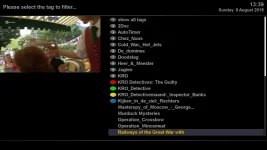
In the movie list use 'Tags' (I've assigned it to the blue-button via the movie list context menu) and you'll see something like:

Tags10.webp

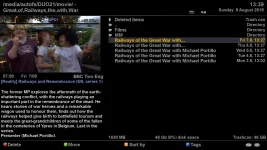
Pick your choice and see all files with that tag grouped:

tags11.webp


That's all folks!
 
Hi Rob

never knew about the tags thanks for the info although agree with others would be handy to set up in timers to be able to put things into folders that way can stick all the wives stuff in her own folders like all the soaps she records and then takes days to get round to watching
 
Last edited:
......Autotimers can be set up to store recordings in different folders.
 
Hi Rob

never knew about the tags thanks for the info although agree with others would be handy to set up in timers to be able to put things into folders that way can stick all the wives stuff in her own folders like all the soaps she records and then takes days to get round to watching
The same with the virtual folders; once a folder has been chosen, which is very easy as I showed you, you come back to the same V-folder after stopping playback.
I really can t see the advantage of many 'real' folders?
 
The same with the virtual folders; once a folder has been chosen, which is very easy as I showed you, you come back to the same V-folder after stopping playback.
I really can t see the advantage of many 'real' folders?

Some of us are coming from a platform like Sky
Its completely fine for me but not for my wife
If things are nicely in folders when she goes into the recorded items, it massively reduces the learning curve for her.
Im sure many other blokes are in the same boat
 
To remove "New:" wouldn't it be something like
Code:
sed -i 's/^[^New:]*:/:/' filename

That syntax maybe incorrect so check if you can.
 
To remove "New:" wouldn't it be something like
Code:
sed -i 's/^[^New:]*:/:/' filename

That syntax maybe incorrect so check if you can.

That will do it for a file (as in it will read in a file and change its contents) but not the name of a file or within a variable
 
......Autotimers can be set up to store recordings in different folders.

Is this where you have to make a folder yourself and then tell the autotimer to put it in there? It's a bit more long-winded than this amazing script that the OP is working on.

I can do the one off versus multiple
So it will group series by folders and leave one offs alone(working on it)
The next is movies they will be a one off so I will have to figure out how to read them as movies via a tag from a file and just pop them in a movies folder

I wonder how you will separate one-off documentaries and shows, from one-off movies for a movies folder. Also, with the default recordings folder called Movie, perhaps name the movie folder as Films?


The current Tags and use of it as a virtual folder is not so great when you have a large HDD and so many tags show up, you literally have to scroll for ages to find a show, rather than typing a show name after pressing Tag.

Folders looks better, works better, is is just organised better.

I'm following this thread qute keenly. Keep up the work.

How does the average person use/execute this script?
Perhaps turn it into an ipk plugin that can be turned off or on?
Maybe by using a script that reverses the folders in case someone decides they no longer want to organise it that way.
 
Last edited by a moderator:
The same with the virtual folders; once a folder has been chosen, which is very easy as I showed you, you come back to the same V-folder after stopping playback.
I really can t see the advantage of many 'real' folders?

Some of us are coming from a platform like Sky
Its completely fine for me but not for my wife
If things are nicely in folders when she goes into the recorded items, it massively reduces the learning curve for her.
Im sure many other blokes are in the same boat

So:
1- clicking on 'Movielist', then on 'blue', next on '<name-of-series>' instead of
2- clicking on 'Movielist' ..................... next on '<name-of-series>'
invokes a steep learning curve :confused:
 
Is this where you have to make a folder yourself and then tell the autotimer to put it in there? It's a bit more long-winded than this amazing script that the OP is working on.


I wonder how you will separate one-off documentaries and shows, from one-off movies for a movies folder. Also, with the default recordings folder called Movie, perhaps name the movie folder as Films?


The current Tags and use of it as a virtual folder is not so great when you have a large HDD and so many tags show up, you literally have to scroll for ages to find a show, rather than typing a show name after pressing Tag.

Folders looks better, works better, is is just organised better.

I'm following this thread qute keenly. Keep up the work.

How does the average person use/execute this script?
Perhaps turn it into an ipk plugin that can be turned off or on?
Maybe by using a script that reverses the folders in case someone decides they no longer want to organise it that way.

Usage
---------------------------------------------------
I placed the script in /home/root
its called organise.sh
i did a chmod a+x on the file to make it executable

I added the following line
*/10 * * * * /home/root/organise.sh
to the following file
/etc/cron/crontabs/root
----------------------------------------------------

Not sure how to turn this into an ipk to be honest
A reversal script would be easy, to iterate through the folders and move everything back up a level.


Also not sure how I will do Movie/Film seperation
The metadata attached to the files sometimes (I will do more testing) does not tell you that its a movie only what movie type it is, Drama , Horror etc
But I will keep looking at this one.
 
So:
1- clicking on 'Movielist', then on 'blue', next on '<name-of-series>' instead of
2- clicking on 'Movielist' ..................... next on '<name-of-series>'
invokes a steep learning curve :confused:

As you said yourself
This was undocumented.
My searches on this and other forums didn't give this information either, so It was then I decided to make my own life simpler by going down the route that Sky does and group stuff via folders.
This makes the transition for my wife far easier.
Now instead of hundreds of items in a single folder they will be grouped ie 90 episodes of Peppa Pig, 50 of Ben And Holly, etc for the Kids and my wifes Soaps all in folders.
I am sharing this information with others in case they want to use it. Other people on forums seemed to be looking for a solution like this so sharing is caring.
 
On vix, you can place a script in /usr/script/
You can then manaully run any script via Blue > Vix > Script Runner

However, the script does not seem to exit nor complete from that location. Had to reboot.


VIX image changed thinsg in DEC 2016. Script location is now /usr/scripts/
 
Last edited:
On vix, you can place a script in /usr/script/
You can then mnaully run any script via Blue > Vix > Script Runner

However, the script does not seem to exit nor complete from that location. Had to reboot.

Weird
Can you putty/ssh the box
Also if you have a lot of files it could have just been taking its time
 
I placed the script in /home/root
its called organise.sh
i did a chmod a+x on the file to make it executable

I added the following line
*/10 * * * * /home/root/organise.sh
to the following file
/etc/cron/crontabs/root

What is chmod a+x etc
 

OpenViX Feeds Status

Back
Top