
Superb quality and spec AB-Com PULSe 4K SE. Crazy offer! Only £129! FREE UK DELIVERY! 4K UHD, Enigma 2, Multiboot 4 images & more!...
Superb quality and spec AB-Com PULSe 4K Rev II Twin Satellite tuner only £179! FREE UK DELIVERY! 4K UHD, Enigma 2, SATA HDD facility, Multiboot 4 images & more!...
You are using an out of date browser. It may not display this or other websites correctly.
You should upgrade or use an alternative browser.
You should upgrade or use an alternative browser.
Show picon in recordings
- Thread starter Willmoore
- Start date


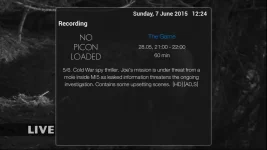
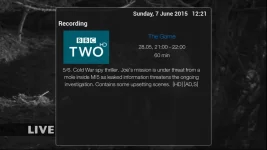
When i view a recorded programme and press for the 2nd info bar I have the picon place holder but no picon. How do I get the picon to show. I am using the confluence skin with the MK picons.
I think this is the Confluence Skin? If so I believe @Rossi - the skin Author - is looking at this. Please see post http://www.world-of-satellite.com/s...ANT-can-you-do&p=358726&viewfull=1#post358726 and an earlier post http://www.world-of-satellite.com/s...nfluenece-skin&p=357554&viewfull=1#post357554
I think this is the Confluence Skin? If so I believe @Rossi - the skin Author - is looking at this. Please see post http://www.world-of-satellite.com/s...ANT-can-you-do&p=358726&viewfull=1#post358726 and an earlier post http://www.world-of-satellite.com/s...nfluenece-skin&p=357554&viewfull=1#post357554
For the Confluence Skin by @Rossi, just incase @Rossi has not got to this yet, here is the fix to the file skin_ViXBMC_1080_Common.xml on path Root\usr\share\enigma2\ViXBMC_1080_Common
See Before and After screen shots and a skin_user .xml that goes on path Root\etc\enigma2. If you are using a skin_user file already, just add this small section.
@Rossi - Could you answer a question for me please? I am wondering how the screens that you write are tied to the remote and skin? For example in the first ViXBMC_1080 skin the GraphicalEPG screen is screen name="GraphicalEPG" and in the ViXBMC_1080 Confluence derivative the "GraphicalEPG" screen is screen name="GraphicalEPGPIG" - I am just wondering how this relationship is set? Also is there a "quick" way of knowing what is the active screen in the skin so that a person can easily locate it and customise? Thanks for the great work.
BEFORE:
AFTER:
Change as skin_user:
View attachment skin_user_ViXBMC_1080_Confluence.zip
R
rossi2000
Guest
do u still get picon when pressing info when watching tv?
Willmoore
Forum Supporter

do u still get picon when pressing info when watching tv?
No you don't. Removed the above 'fix' and picon returned when pressing info.
No you don't. Removed the above 'fix' and picon returned when pressing info.
Please read this post -> here
The code around "Eventview" screen and "Info" button for Live TV AND "EventviewSimple" screen and Recorded Movie has changed between Hades 11 -> Hades 12.
As "EventviewSimple" is now a panel for "Eventview" the "fix" referred to above cannot now work for Live TV!
!!The picon widget requires a different type for live TV versus recorded movies - see link above!!
The attached modded skin_user .xml file should make both screens work again, but I am afraid it's too late in the day to test!
One last word of warning - @Rossi also uses the "EventviewSimple" panel in the "InfoBarEventView" screen, and I am sorry I don't know which screen that is, so there could be an impact there?
View attachment skin_user_ViXBMC_1080_Confluence.zip
Last edited:
One last word of warning - @Rossi also uses the "EventviewSimple" panel in the "InfoBarEventView" screen, and I am sorry I don't know which screen that is, so there could be an impact there?
It was too late last night
 . When I looked at the .XML this evening I see the InfoBarEPG uses the aforementioned screen. I have introduced an EventViewSimpleLiveTV screen for the panel in "EventView" and "InfoBarEventView" screens. As far as I can see all EventView screens work in Hades 12 with this mod maybe @Willmore can confirm?. Over to @Rossi
View attachment skin_user_ViXBMC_1080_Confluence.zip
J
jwestwood74
Guest
sorry for being a little thick here but im looking to get the picons on the recordings info as above but i dont understand what i need to do with the above file to get it to work i initiall thought i just copied all the data in the XML into the skin_ViXBMC_1080_Common.xml file over the top of the old eventview section but that just put my box into a constant boot loop
J
jwestwood74
Guest
Have tried putting unzipped file (skin_user_ViXBMC_1080_Confluence.xml) into /etc/enigma2 and also into \usr\share\enigma2\ViXBMC_1080_Common Both done absolutely nothing
J
jwestwood74
Guest
yes even restarted the whole box
sorry for being a little thick here but im looking to get the picons on the recordings info as above but i dont understand what i need to do with the above file to get it to work i initiall thought i just copied all the data in the XML into the skin_ViXBMC_1080_Common.xml file over the top of the old eventview section but that just put my box into a constant boot loop
The problem you had is typical if when the Skin .xml cannot parse - ViX will crash. The good news is that the E2 box will be still up, and you can FTP to it still and undo the change you made.
Anyway as @Willmoore said, any skin_user file must be placed in the /etc/enigma2 folder, and the naming convention must be as per the Skin name - the file name should be exactly the name as posted, including upper and lower case.
With skin_user .xml files you can customise screens of the main skin - the skin_user file gets read last. In this case the code just changes some eventview references.
More good news is that @Rossi will be incorporating a fix for this issue shortly, so the skin_user will not be needed.
As @Willmoore also said, any/all skin file changes require a GUI restart.
Finally, it is never a good idea to change the master skin files in usr/share/enigma2 as the files are overwritten each time you perform an update
Summary:
1. Make sure you are using the .xml file from post #7
2. Make sure you unzip the file and keep the same name exactly when you unzip
3. The fix is only for Confluence skin
4. The file must be placed in /etc/enigma2 folder
Good Luck, and I hope this helps
J
jwestwood74
Guest
The problem you had is typical if when the Skin .xml cannot parse - ViX will crash. The good news is that the E2 box will be still up, and you can FTP to it still and undo the change you made.
Anyway as @Willmoore said, any skin_user file must be placed in the /etc/enigma2 folder, and the naming convention must be as per the Skin name - the file name should be exactly the name as posted, including upper and lower case.
With skin_user .xml files you can customise screens of the main skin - the skin_user file gets read last. In this case the code just changes some eventview references.
More good news is that @Rossi will be incorporating a fix for this issue shortly, so the skin_user will not be needed.
As @Willmoore also said, any/all skin file changes require a GUI restart.
Finally, it is never a good idea to change the master skin files in usr/share/enigma2 as the files are overwritten each time you perform an update
Summary:
1. Make sure you are using the .xml file from post #7
2. Make sure you unzip the file and keep the same name exactly when you unzip
3. The fix is only for Confluence skin
4. The file must be placed in /etc/enigma2 folder
Good Luck, and I hope this helps
Tried all the above and still not getting picon on second info screen just the NO Picon loaded
Tried all the above and still not getting picon on second info screen just the NO Picon loaded
@jwestwood74: Are you using Hades 12? Which second info screen are you referring - The recorded movies "EventView" OR Live TV "EventView"? I assume Picons are installed and that Picons are working on Main Infobar? If it is the Hades 12 version of the Confluence skin, you will have picons in the EPG and in the Channel List also.
I see from earlier post that you placed the "skin_user" file in the ViX1080 skins "common folder" - have you removed this skin_user file?
Are you using the skin_user file from post 7 with ViX Hades 12? If you are on Hades 11, then you need the skin_user file from post 3 above.
If these steps fail, please check your version of Hades and update to 12. Then and if necessary remove the Confluence skin altogether (including other 1080 skin varients - Vix 1080 and Vix 1080 Bello and Vix 1080 Confluence) and reinstall from the start - I say this becasue of what you posted re the common folder, as well as the edits made to the common xml of the skin.
I have tested the skin_user, and from everything @Willmoore says, he has also.
I have exhausted pretty much everything I can think of - I hope this last post helps. Good Luck
J
jwestwood74
Guest
@sigpark
1: I am using hades 12
2: i can see picons on the main info bar, EPG, Live eventview just not in the recorded movie eventview.
3: Am using the xml file from post 7
4: have now uninstalled all 1080 skins as i had confluence and bello both installed
5: removed the XML in post 7 from common folder
6: Reinstalled Confluence Skin
7: Unzipped the file in post 7 leaving me with skin_user_ViXBMC_1080_Confluence.xml
8: opened up Filezilla and ftped skin_user_ViXBMC_1080_Confluence.xml to ECT/Enigma2 where all the userbouquet files are
9: Rebooted box and still not got picons on the recorded Eventview but like before have still got them in all the other views
1: I am using hades 12
2: i can see picons on the main info bar, EPG, Live eventview just not in the recorded movie eventview.
3: Am using the xml file from post 7
4: have now uninstalled all 1080 skins as i had confluence and bello both installed
5: removed the XML in post 7 from common folder
6: Reinstalled Confluence Skin
7: Unzipped the file in post 7 leaving me with skin_user_ViXBMC_1080_Confluence.xml
8: opened up Filezilla and ftped skin_user_ViXBMC_1080_Confluence.xml to ECT/Enigma2 where all the userbouquet files are
9: Rebooted box and still not got picons on the recorded Eventview but like before have still got them in all the other views
Hi @jwestwood74. I have to say "thanks" for trying all suggested - I realise it is frustrating and disruptive. It is just about the very best I can do. From all you say, I don't understand - you have taken all the correct steps it seems?
If you want to try something as part of "debug", you can take the skin_user file from post 3 which changes the behaviour of the screen "EventViewSimple". @Rossi updated his code in the Hades 12 release of Confluence, however the original file in post 3 should change the behaviour of the recorded EventView so that the picon works, but because @Rossi is using Panels now (based on EventViewSimple), that original mod will break the picon in the other EventView screens only, this will prove two things:
1. That the skin_user xml is being used or not
2. Changing the code does have an impact on the skin behaviour
It is only a debug process.
Good news is that @Rossi will update the Confluence skin to enable this feature shortly, thus making the "mod/fix" redundant.
Best I can do with the info you supplied. Good Luck
If you want to try something as part of "debug", you can take the skin_user file from post 3 which changes the behaviour of the screen "EventViewSimple". @Rossi updated his code in the Hades 12 release of Confluence, however the original file in post 3 should change the behaviour of the recorded EventView so that the picon works, but because @Rossi is using Panels now (based on EventViewSimple), that original mod will break the picon in the other EventView screens only, this will prove two things:
1. That the skin_user xml is being used or not
2. Changing the code does have an impact on the skin behaviour
It is only a debug process.
Good news is that @Rossi will update the Confluence skin to enable this feature shortly, thus making the "mod/fix" redundant.
Best I can do with the info you supplied. Good Luck
R
rossi2000
Guest
it doenst work fully
press ok twice on the recording, no picon
press info watching recording, picon.
press ok twice on the recording, no picon
press info watching recording, picon.

abu baniaz
Moderator
it doenst work fully
press ok twice on the recording, no picon
press info watching recording, picon.
I have not edited anything and mine behaved like that.
Similar threads


- Replies
- 11
- Views
- 316

- Replies
- 6
- Views
- 529

- Replies
- 1
- Views
- 102