Superb quality and spec AB-Com PULSe 4K SE. Crazy offer! Only £129! FREE UK DELIVERY! 4K UHD, Enigma 2, Multiboot 4 images & more!...
Superb quality and spec AB-Com PULSe 4K Rev II Twin Satellite tuner only £179! FREE UK DELIVERY! 4K UHD, Enigma 2, SATA HDD facility, Multiboot 4 images & more!...

Engima 2 - Samsung SMART TV Streaming app

pembo

ViX Beta Tester
Joined
Jun 29, 2014
Messages
642
Reaction score
1
Points
0
Location
UK
DreamStream - Samsung SMART TV Enigma2 Streaming app

I'm finally at the point now where I can release a preview of the beta of the DreamStream app for Samsung SMART TVs in a limited manner.

If you're interested, you can find some information here
http://www.pembo.co.uk/dreamstreamblog/

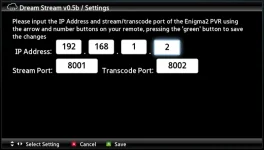
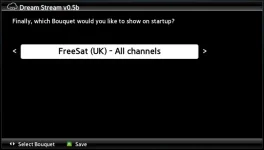
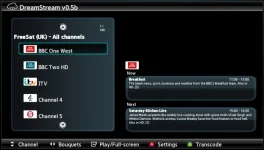
Screenshots attached

Welcome
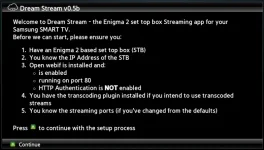
ds1.webp

IP/Port
ds2.webp

Starting Bouquet
ds3.webp

Main Screen
ds4.webp

Unfortunately right now, I can't make this publicly available until I organise a dedicated server to distribute this.

If anyone is interested in trying this and providing feedback, please let me know either via the website or via a message here. I'll then grant you a limited time access to synchronise this to your TV for testing.

Pembo
 
Last edited:
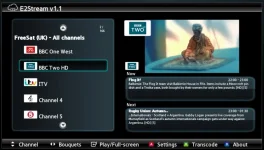
E2Stream v1.1 released

I'm pleased to officially release e2stream v1.1.
The Samsung SMART TV app to stream your enigma 2 based set top box to your SMART TV.
e2streamv11.webp

This release is now fully downloadable and comes with it’s own installer to allow you to install this to your Samsung SMART TV without having to connect to a hosted instance of the sync server.

You can find more information and download this from here:
http://www.pembo.co.uk/2014/11/08/e2stream-v1-1/
 
Looks very cool thanks Pembo. Can we view recordings also?
 
Congratulations Pembo, how do you send the app to the TV or is it available to download straight from Samsung hub?
 
Congratulations Pembo, how do you send the app to the TV or is it available to download straight from Samsung hub?

It's not in the app store yet, there is no obvious way of submitting.
You need to enable the 'develop' account on your TV and then sync the app as a 'user' app onto your TV.

You can find the install instructions here:
http://www.pembo.co.uk/e2stream
 
Cool. Any plans to open source it? I could help out.

Almost certainly... there's no real way of 'monetising' with the European Samsung TV app store anyway and I've built this for my own use initially.
The code is a bit (read quite a lot) hacky right now!

There's no compiled app as such anyway, and therefore in actual fact all the code is shipped, you just need to know how to get it out, but as with everything else I've built in recent years, I'll set up a google code project for it at some point soon and check the code into there. There's a few manual steps to refine first to make the dev/build process easier.
 
Sounds good. I'll take a look. Currently I use a Raspberry Pi for watching recordings from downstairs. This app could remove that dependency for me.
 
Just got it installed and it works great with my Duo2. Thanks Pembo. I'll be donating.

I had a look inside the package and mostly just found Java class files. What language did you write the app code in?
 
it's all in javascript pretty much using Samsung smart tv apis, but the app is packaged up to make distribution / installation more straight forward. The installer is wholly java.
 
Gotcha. I'll take a look at it more during the week and see if I can help add recordings playback. Thanks again.
 
amazing work

would be amazing if you could develop an app for some hdmi stick, then your market would not be limited by just samsung tv's
 
I have this installed on a Samsung Blu-Ray player but I'm afraid I can't get it to stream :confused:

It's connecting to my LX3 and Duo but when I hit ok it throws a network error.. I assume that the streaming ports on both receivers are 8001 as I haven't changed this? I'm not sure where to check this?
 
is this just limited to samsung smart tvs or can it be used on normal samsung tvs?
 
I have this installed on a Samsung Blu-Ray player but I'm afraid I can't get it to stream :confused:

It's connecting to my LX3 and Duo but when I hit ok it throws a network error.. I assume that the streaming ports on both receivers are 8001 as I haven't changed this? I'm not sure where to check this?

Yes.. try it through openwebif and see what you get. You should be able to save the .m3u file, look inside it and see what port is being used, though I don't think you can change the default streaming port anyway!

If it works through openwebif on pc, then it should work through the 'smart' device but it would need the right codec to be able to play, and this isn't something you can add in. Therefore I guess it's possible the Blu-ray player has limited codecs.
 
I've just updated the installer to allow for installation of other 'user' apps to avoid the issue where you can only synchronise with one server.
The SMART TV app remains the same, only the installer has been updated.

See here for more information:
http://www.pembo.co.uk/2014/11/10/e2stream-v1-1-1/
 
Yes.. try it through openwebif and see what you get. You should be able to save the .m3u file, look inside it and see what port is being used, though I don't think you can change the default streaming port anyway!

If it works through openwebif on pc, then it should work through the 'smart' device but it would need the right codec to be able to play, and this isn't something you can add in. Therefore I guess it's possible the Blu-ray player has limited codecs.

Thanks for the explanation pembo!

If it was the codec issue would it throw a network interference error?
 
Thanks for the explanation pembo!

If it was the codec issue would it throw a network interference error?

Quite probably... other thing which it could be, which was a bug I've spotted recently - if all your tuners are in use, and you try to watch another channel, you'll see this error. I need to detect and grey out channels that can't be tuned when tuners are locked!
 

OpenViX Feeds Status

Back
Top