Superb quality and spec AB-Com PULSe 4K SE. Crazy offer! Only £99! FREE UK DELIVERY! 4K UHD, Enigma 2, Multiboot 4 images & more!...
Superb quality and spec AB-Com PULSe 4K Rev II Twin Satellite tuner only £149! FREE UK DELIVERY! 4K UHD, Enigma 2, SATA HDD facility, Multiboot 4 images & more!...

How To Setup XBMC To Stream Live Tv And Recording From An Enigma2 Box...

pac2000

New member
Joined
Oct 13, 2012
Messages
189
Reaction score
1
Points
0
First Of All Download And Install XBMC Frodo
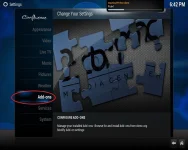
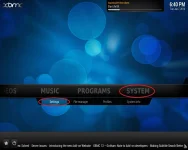
Then Run It And Goto System, Then Settings
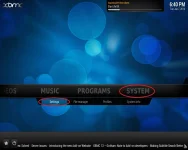
1SysSet.webp

Then Select Add-ons

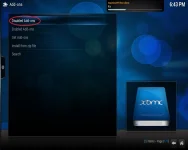
2AddOn.webp

Then Select Disabled Add-ons

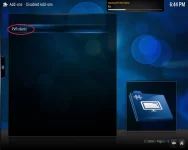
3DisAddons.webp

Then Select PVR Clients

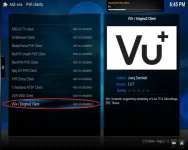
4PVRClients.webp

Then Select Vu+ / Enigma Client

5VuPlus.webp

Make Sure You Select Enable And Then Click Configure
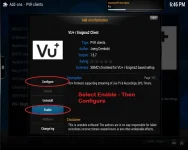
6VuPlusEnable.webp

In The Generals Tab, Insert Your Enigma2 Box IP Address
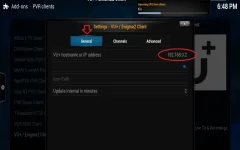
7VuPlusGeneral.webp

In The Channels Tab, Select A Local Folder For The EPG/Recordings Data (You May Want To Create This Folder First)
If Your Enigma2 Box Has Only 1 Tuner, Select 'Zap Before Channel Switch'
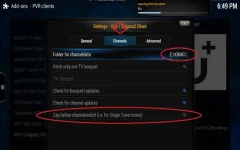
8VuPlusChannels.webp

In The Advanced Tab, Input Your Username (Default : root) And Your Password (Default : dreambox)
And Your Recording Folder On The Box (Default : \media\hdd\movie)
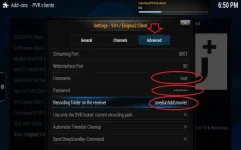
9VuPlusAdvanced.webp

That's The Add-on Configured​
 
Go Back To The Home Screen And Select System And Settings Again

10SysSet.webp

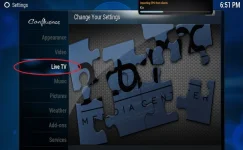
Then Select Live TV

11LiveTV.webp

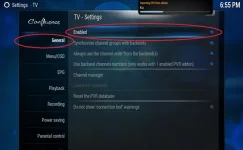
In The General Tab, Make Sure You Select Enable

12Enable.webp

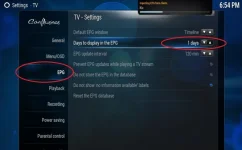
Then In The EPG Tab, Select How Many Days You Want To Store
Select Several Days So That You Don't Have To Wait A Long Time Every Time You Start XBMC Up

13EPG.webp

Quit XBMC, And Restart... You'll Notice It Starts Importing EPG Data, And Live TV Is Now Available

14Final.webp

It'll Take Some Time The First Time, About 20 Minutes
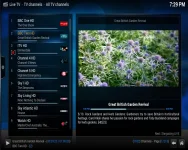
And Here It Is Working

15Working.webp

Next Time You Start The XBMC, It'll Pull The EPG From The Local Folder
Then Update The Channels/Recordings
This Takes Only A Matter Of Seconds
You Can Then Use It The Stream Live TV/Recordings

Although It Will Re-Import The EPG In The Background Which Will Take About 20 Minutes Again

Enjoy...​
 
Thanks for this, I had never considered it. If it's fast enough and easy enough to use, it would make a decent set up for a second room!


Sent from my iPhone using Tapatalk
 
I previously tried this about a month ago using my Apple Tv with the Vu PVR installed, but when it came to watching everything it lagged continously leaving nothing watchable. That was streaming via Homeplugs from ATV to router, and ethernet from router to Solo 2 box. So unlessI hadn't configured something properly, it was useless for me. Has anyone else had better results with an ATV2?
 
Tyler, You Don't Need To Do Anything On The Enigma2 Box...

lfcjim82, I Get Perfect Results In HD On My Quad Core 2.6 Ghz Computer, And Perfect SD Results On My 2.2Ghz Single Core PC... (Both Ethernet Hard Wired Using A Gigabit Switch)

Will Post Results On My Dual Core When I've Tested It...
 
Thanks for this great tutorial. .. how do I get it to display picons?

Sent from my GT-I9100 using Tapatalk
 
It Displays Picons Automatically... You Don't Need To Configure It...
 
Okay where do I download the xmbc frodo? I can't find it on the plugins ? I have vu solo 2 vix 3 build 808. Or I cannot download and get this running on my vu solo 2
 
@ Naz,This is a program u download and install on your computer.

Sent from my GT-I9100 using Tapatalk
 
It Displays Picons Automatically... You Don't Need To Configure It...

But mine is not showing the picons yet, although still importing EPG from clients. .do I have to wait for that to finish?

Sent from my GT-I9100 using Tapatalk
 
It's For A Pc, Or Any Device That Can Run The XBMC...

Like A Raspberry Pi, Android, OpenElec, MAC, Linux, Windows Etc...

Code:
http://xbmc.org/download/
 
Yes Initially You Need To Wait For It To Completely Download The EPG/Picons/Recording Data... It Takes About 20 Minutes... And After That When Starting XBMC, It Quickly Loads Them Locally Within Seconds... But If You Set Your EPG To Only 1 Day, And Don't Start It For 2 Days After, You'll Have To Wait The 20 Minutes Again Before Everything Is Upto Date... Which Is Why I Recommend To Set It To Several Days... I've Found There's No Difference Between 1 And 3 Days In Terms Of Download Time...
 
Mine is taking forever to download... i guess it has to do with my machine spec 2.1Ghz 2Core 4RAM
Yes Initially You Need To Wait For It To Completely Download The EPG/Picons/Recording Data... It Takes About 20 Minutes... And After That When Starting XBMC, It Quickly Loads Them Locally Within Seconds... But If You Set Your EPG To Only 1 Day, And Don't Start It For 2 Days After, You'll Have To Wait The 20 Minutes Again Before Everything Is Upto Date... Which Is Why I Recommend To Set It To Several Days... I've Found There's No Difference Between 1 And 3 Days In Terms Of Download Time...
 
Is It Hard Wired??? All My PC's Take About 20 Minutes... And One Is On WiFi (But Has A Brilliant Signal(2 Metres Away))

Your Spec Has Nothing To Do With It... My Single Core 2.1Ghz Wifi Laptop With 2Gb Takes The Same Time As My Quad 3.4Ghz 8Gb 120Gb SSD Server With Gigabit Network Card Directly Connected To A Gigabit Switch... The Latters Startup However Is Blisteringly Fast... No XBMC Frodo Splash Screen, And The Local Load Is About 1.5 Seconds Including Channel And Recording Update...

However The Laptop Can Handle SD Live TV/Recordings Perfectly... I've A Bit More Testing To Do To Determine What Specs Will Provide Perfect HD... When I've Done That I'll Post Back...After That I'll Be Testing An Android Quad Core Mini PC/Media Centre With 2Gb To See If That Can Handle The Live HD Hard Wired... And Again I'll Post Back The Results...
 
Is It Hard Wired??? All My PC's Take About 20 Minutes... And One Is On WiFi (But Has A Brilliant Signal(2 Metres Away))

Your Spec Has Nothing To Do With It... My Single Core 2.1Ghz Wifi Laptop With 2Gb Takes The Same Time As My Quad 3.4Ghz 8Gb 120Gb SSD Server With Gigabit Network Card Directly Connected To A Gigabit Switch... The Latters Startup However Is Blisteringly Fast... No XBMC Frodo Splash Screen, And The Local Load Is About 1.5 Seconds Including Channel And Recording Update...

However The Laptop Can Handle SD Live TV/Recordings Perfectly... I've A Bit More Testing To Do To Determine What Specs Will Provide Perfect HD... When I've Done That I'll Post Back...After That I'll Be Testing An Android Quad Core Mini PC/Media Centre With 2Gb To See If That Can Handle The Live HD Hard Wired... And Again I'll Post Back The Results...

It's wifi and about 3 meters away. .. It's time to consider an upgrade. . My pc is about 4 & half years old. .lol

Sent from my GT-I9100 using Tapatalk
 
Hi
After having problems getting into site to download proggy i finally did it and following your instructions i managed to get it working, just one problem i found is i have a multi satellite setup so when reading from the stb my channel list it went for east to west, when the list appeared after loading the list is numerical so i had to scroll through 7000 channel to find the 28east channels what really is needed if reading data from stb is the satellite xml file so your able to select the bird from which you wish to view channel, can this be done or is the program limited.
 
If You Left Click TV Channels (Far Left Sliding Menu) It Rotates Through The Bouquet's... If You Right Click The Space To The Right Of TV Channels, And Select Group Management, You Can Directly Go To A Bouquet, But You Have To Hover Over TV Channels Again...
 

OpenViX Feeds Status

Back
Top