


To all members. Due to the amount of bug report and support threads that are being posted with a severe lack of information we have decided to implement a new way of using ViX Support section HERE
ALL members will be soon forced to provide more information. I've asked Staff to now ignore anymore threads with a lack of info, we are NOT mind readers.
Below is a guide how to use the new feature when its implemented.
As you all now for ViX specific support you most post HERE
1) Click on POST NEW THREAD top let corner just above existing threads.
2) Once the new Features are introduced you will see the screen below. Select the correct category and click on 'Post New Entry'.

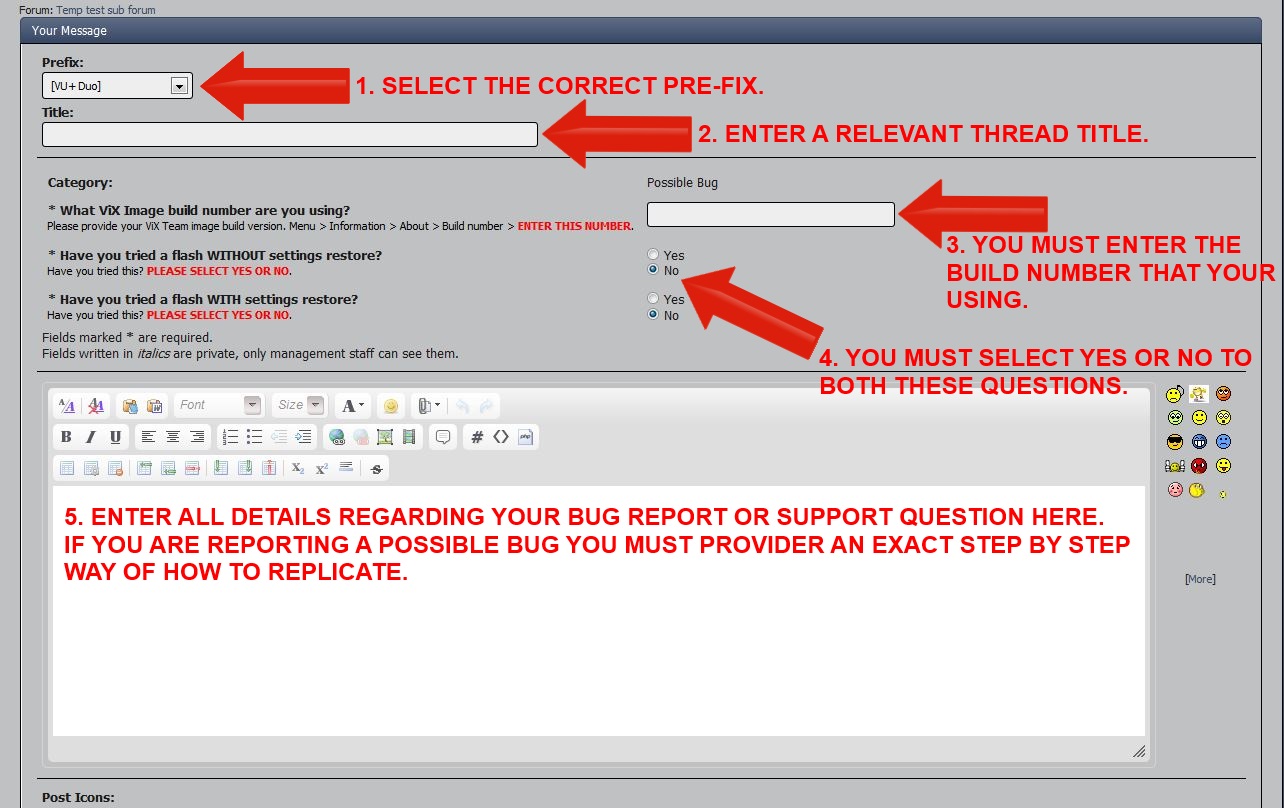
3) Next you will you will see the screen below, ensure that you enter all the required information as detailed in the screenshot.
WITH THIS NEW SYSTEM IN PLACE THREADS IN VIX SUPPORT SECTION WILL NOT BE ABLE TO BE CREATED USING TAPATALK AND POSSIBLY OTHER MOBILE APPS, BUT CAN BE REPLIED TOO USING MOBILE APPS.
ALL members will be soon forced to provide more information. I've asked Staff to now ignore anymore threads with a lack of info, we are NOT mind readers.
Below is a guide how to use the new feature when its implemented.
As you all now for ViX specific support you most post HERE
1) Click on POST NEW THREAD top let corner just above existing threads.
2) Once the new Features are introduced you will see the screen below. Select the correct category and click on 'Post New Entry'.
3) Next you will you will see the screen below, ensure that you enter all the required information as detailed in the screenshot.
WITH THIS NEW SYSTEM IN PLACE THREADS IN VIX SUPPORT SECTION WILL NOT BE ABLE TO BE CREATED USING TAPATALK AND POSSIBLY OTHER MOBILE APPS, BUT CAN BE REPLIED TOO USING MOBILE APPS.
Last edited by a moderator:


