Superb quality and spec AB-Com PULSe 4K SE. Crazy offer! Only £129! FREE UK DELIVERY! 4K UHD, Enigma 2, Multiboot 4 images & more!...
Superb quality and spec AB-Com PULSe 4K Rev II Twin Satellite tuner only £179! FREE UK DELIVERY! 4K UHD, Enigma 2, SATA HDD facility, Multiboot 4 images & more!...

[TM-TWIN-OE] Subtitle Background

  • Thread starter Thread starter bmwcare
  • Start date Start date
B

bmwcare

Guest
ViX 3.0 build 683 on TM-TWIN-OE

Subtitles working fine, however I would like to not have them transparent. That is, I'd like them to have a black background.

Is this possible? Or is there a plugin to achieve what I'm looking for?

Thanks
 
When you press the subtitle button, are you given more than one choice for the channel you are watching?
If so, try the other choices given.

Also, there are some extra subtitle menues, change size, position and so on, can't remember how to get to them off hand, but have a look around & you should find them.
 
Thanks judge.
Yes, there are other options sometimes and I can change the colour to yellow or white in setting menu. However it doesn't have a black background behind the subs.

This is for a relative with poor sight and she finds it difficult to read them depending on the actual background picture.

Thanks again
 
Just checked BBC 1 & 2 here & the second option in subtitles has a black background.
Anyway, I'm sure you can change this somewhere, I don't use them myself so am not sure where I previously spotted the customisation options...
Try pressing the menu button in various related screens & you might find it before someone else jumps in with the solution...
 
I'm having the issue with RTE1 (Irish channels) and Sky Movies.
I'm away from base at moment so can't check BBC FTA channels. I will later.
 
OK, Just checked RTE 1 & couldn't get an easily readable subtitle with background, tried as many menu options as I could think of...
Maybe it's there somewhere, sure it was before but can't find it now...
So, opened a feature request, if it can be done & Andy has the time, I'm sure he'll look into it.
Thanks for reporting it.
 
I really don't understand it: I always use subtitles, and never have any problem reading them. And I most certainly would advise against adding a background.

Be aware that there are two kinds of subtitles:
1- DVB-titles. That are 'pictures' that can only be displayed as-is (only transparency can be changed).
2- TeleText-subtitles: they are being extracted as text from TT and are completely rendered again. One of the beauty's of the present implementation, is that an adjustable border has been added. Simply enlarge that border to make the text better readable.

PS: When using TT-subs the background option is already there. Don't use the subtitle selection, but use TT page xxx instead.
 
Last edited:
rob beat to it, he is correct what he says.
 
Tested on BBC and yes, there is option of background on them.
However, on Irish channels that option is not there.

The issue is when you have white/yellow subs with a bright picture... For those with poor sight it is difficult to read.

The digital terrestrial service here has that type of subtitle background and she can read that perfectly. It's a pity that similar option is not available on the Irish sat channels.

Thanks
 
2- TeleText-subtitles: they are being extracted as text from TT and are completely rendered again. One of the beauty's of the present implementation, is that an adjustable border has been added. Simply enlarge that border to make the text better readable.

I've made the font as large as possible and moved it to position.

I did not try the teletext 888 option. I shall try that later. I was using the subtitle button on TM remote.

Thank you.
 
Yes. There is no problem with the size and position of the text. And it's perfect when the tv picture is dark behind the text. It's only when it's bright, for example, skyline etc.
I don't mean the size and the position: I mean the border (i.e. the black border around the text; in fact that's the background you asked for).
 
I don't mean the size and the position: I mean the border (i.e. the black border around the text; in fact that's the background you asked for).

I did not see that option in Subtitle Settings...

I will double check when I get home tonight
 
Border setting is not there with standard subtitles.
Using teletext 888 option does not work at all on channels I tried.
The background does come on some subtitle streams but not on all or even nearly all.
Irish channels don't have the option at all...

Is there another skin I could try? Does anyone know if the pli image has background option?
I really don't want to change from ViX though.

Thanks again for your help
 
Tested on BBC and yes, there is option of background on them.
That's because you picked the (ugly) DVB-subs. The transparancy of the background can be adjusted.
Those channels also provide the TT-subs, so please use them for a moment to experiment with the title-border. I just set it to the max value (5) and IMHO it provides a very good readable text on a bright background.

However, on Irish channels that option is not there.
That's because they use the nice-to-render TT-subs; now you have the option to adjust the border.

PLi has the very same excellent options as ViX has.
 
That's because you picked the (ugly) DVB-subs. The transparancy of the background can be adjusted.
Those channels also provide the TT-subs, so please use them for a moment to experiment with the title-border. I just set it to the max value (5) and IMHO it provides a very good readable text on a bright background

It's the 'ugly' ones I require!
The lady finds it difficult to read unless black background...
However, I can't get DVB type subs on RTE channels or a lot of the movie channels


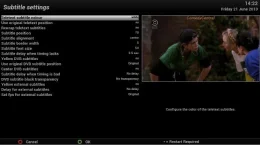
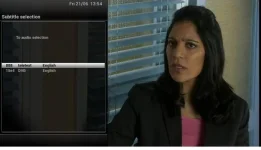
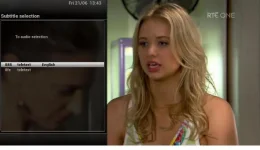
The options available to me are attached:

subtitle options.webpbbc text option 1.webprte text option 1.webp
 

OpenViX Feeds Status

Back
Top