Superb quality and spec AB-Com PULSe 4K SE. Crazy offer! Only £99! FREE UK DELIVERY! 4K UHD, Enigma 2, Multiboot 4 images & more!...
Superb quality and spec AB-Com PULSe 4K Rev II Twin Satellite tuner only £149! FREE UK DELIVERY! 4K UHD, Enigma 2, SATA HDD facility, Multiboot 4 images & more!...

[ViX_Misc] Problem after online update to latest Vix version

sledge121

Forum Supporter
Donated Member
Joined
Sep 3, 2012
Messages
204
Reaction score
0
Points
0
Location
Stockport
Ran an online update, now every few minutes I get an alert on the screen saying

Job View
SoftcamCheck
100/100
Finished

I can clear it by pressing the green circle or the ok button but after a few minutes it returns. How do I permanently stop it.

Cheers
Sledge
 
This is a bug that we are aware of and in the process of tracking down. for now you can disable the Cam check by pressing menu while in the softcam manager. remember to re-activate it once we have fixed the bug however as it does serve a important function.
 
We aware of latest issue..

Best is to flash you backup image before the unstable update
 
I never seem to have much luck using online update, probably better to choose a release and stick to it, it's difficult though cos I'm an update junky.
 
I never seem to have much luck using online update, probably better to choose a release and stick to it, it's difficult though cos I'm an update junky.
Naahh, as a real junky you have simple means of reverting to a previous release when needed.
But indeed: due to a number of major improvements/rewrites we did suffer from instabilities lately. Hence we have the feeds marked as 'unstable'.
 
Getting a new error now, another job view, this time for auto timer
That's the same error.
But you're in for a quick & dirty fix? Unzip the attached file to /usr/lib/enigma2/python/Screens

But don't forget to update as soon as an update is available.
 

Attachments

Another problem, I hope it's OK to post it here
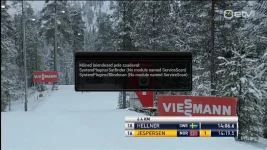
After update I get this: Some plugins are not available
Build 467screenshot.webp
 
Autobouquet is not working ? will try to re install
 
Re-installed still not working get message some plugins are not available
extensions /Autobouquets (no module named ServiceScan)
SystemPlugins/SatFinder (no module named ServiceScan)
SystemPlugins/positionerSetup (no module named ServiceScan)
SystemPlugins/Blindscan(no module named ServiceScan)
 
I'm still getting the auto timer job view after unzipping the fix and rebooting.
 
Dont worry mate, we have thrown a few mars bars into andy's cage and he's busy working off the sugar rush making the fix.

wont be too long now.
 
A good feature would be the ability to online update to a specific release rather than the latest.
 

OpenViX Feeds Status

Back
Top