Superb quality and spec AB-Com PULSe 4K SE. Crazy offer! Only £129! FREE UK DELIVERY! 4K UHD, Enigma 2, Multiboot 4 images & more!...
Superb quality and spec AB-Com PULSe 4K Rev II Twin Satellite tuner only £179! FREE UK DELIVERY! 4K UHD, Enigma 2, SATA HDD facility, Multiboot 4 images & more!...

[VU+ Duo] New VIX Image Vu+ Duo Version 2.4 15/05/2012 - DISCUSSION ONLY -

Ok, I'll see what I can do, which one is the file where this things are programmed?

G
 
Would it be possible to put it back when the second info bar is disabled and the crypto info is selected?
Not by editing the skin. That info would need to be available from the image on the first button press.
 
I there, I've missed something.
Updated to build 135.
My Picons are not showed anymore both in EPG and OSD on ok pression.
But picon folder is stil there on my USB


second:
could be possible to implement the dont size resizing function for EPG description of the event, besides channel list ones?
 
Tested in Duo & Solo - DVBT WinTV Nova TD & Avermedia Volar:

After an Enigma restarting it can't find any DVBT channel.

VIX 2.4 Build 135

Thank you for the best image for VU!!!
 
I there, I've missed something.
Updated to build 135.
My Picons are not showed anymore both in EPG and OSD on ok pression.
But picon folder is stil there on my USB
I've discovered that the picons present on the usb picon folder were deleted. And I don't know how.
I used the Golden Nuggets ones.
They just disappeared after 2.4 installation. Any clue?


some more feedback.
Today I installed 2.4 build 135 on my second DUO. And on this I installed the Magic-HD skin from Plugin feed too.
On this the picons are showing fine. While on first Duo not.
As said on both receivers I have the some skin installed but on the first Magic-HD skin shows EPG details in BLUE fonts, while on the second they are showed on the old Yellow colour style.
So I ftp on both and noticed that everythig is the same for both:
Blue one has both Magic-HD and Magic-HD-Common

yellow one has both Magic-HD and Magic-HD-Common
(xml details:Magic-HD-ViX Vs 4.55 by Rob van der Does)

the only difference is that on the yellow one there's the MAGIC -SD (Magic-ViX Vs 1.28 by Rob van der Does) installed aswel.
Could this in some way affect the colours of the active Magic-HD skin?
 
Last edited:
......
Blue one has both Magic-HD and Magic-HD-Common
yellow one has both Magic-HD and Magic-HD-Common
(xml details:Magic-HD-ViX Vs 4.55 by Rob van der Does)
the only difference is that on the yellow one there's the MAGIC -SD (Magic-ViX Vs 1.28 by Rob van der Does) installed aswel.
Could this in some way affect the colours of the active Magic-HD skin?
What happens if you de-install Magic-SD (and reboot the box)?
 
What happens if you de-install Magic-SD (and reboot the box)?

I'll try it as soon as my wife fall asleep and I'm free to handle that DUO. ;-P

Anyhow. I was tuning the first duo.
Since I've on this an external usb hdd I set via VIX menu to use it as hdd. And the duo restarted.
After the boot process the duo display is stuck as shown on the attached image:
it's not responding to any remote command. But CCcam is working and sharing on my LAN.
The only log I've is the one attached but I cannot see anything odd on it. (how to recon a crashlog and a debug log?)

Luckyly if I connect to this hanged duo using Idream_X I'm able to control it.
 

Attachments

Just reboot the box using the power switch on the back.
If it happens again then, remove the USB key with EPG on it & reboot again.
 
Just reboot the box using the power switch on the back.
If it happens again then, remove the USB key with EPG on it & reboot again.
As said, since I can connect and control the duo using iDreamX, I could make it reboot without switching from the power switch.
But why do you thing it's a EPG related issue? Did you find any offending code in my log?
 
What happens if you de-install Magic-SD (and reboot the box)?

I'll try it as soon as my wife fall asleep and I'm free to handle that DUO. ;-P

Anyhow. I was tuning the first duo.
Since I've on this an external hdd I set via VIX menu to use it as hdd. And the duo restarted.
After the boot process the duo display is stuck as shown on the attached image:
it's not responding to any remote command. But CCcam is working and sharing on my LAN.
The only log I've is the one attached but I cannot see anything odd on it. (how to recon a crashlog and a debug log?).

EDIT notes:
The colour description was just the opposite I wrote.
Yellow on the first (with no Magic-SD installed) and blue on the second (with MAgic-SD installed.

Now, after the first Duo hanged with that wird message on he Display and switched it off by the power button. It restarted and now is showing colour with blu layout. As it should.
What the hell! How could that be?
 
Last edited:
Seems iDreamX is no longer working as it should with the latest build, or is it just me?

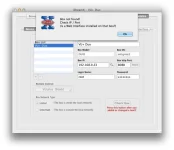
Screen Shot 2012-05-27 at 09.46.23.webp
 
your using the wrong HTTP port, In ViX 2.4 the default HTTP port is 80 change the HTTP port in iDreamX to match this.
 
no issue here, just check HTTP port as phoenix suggest and make sure Openwebif is enabled.
I'm controlling both my DUO flawlessly
 
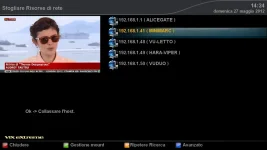
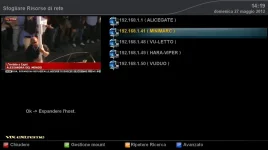
collapse.webpexpand.webpOk mates some few feedback about my Network Browser issue:
Besides NFS I've tried installing AFP service to check if network browser works (as told I only use Mac OS X computers):
So when network browser shows the available devices
it says: OK to expand the host
then asks for username and password
then says OK to collapse host
and at this point nothing happens, it does not collapse to show available shares.
Again it says: OK to expand host.

As I previously pointed adding manually the shares works, but no way with NB on both my DUOs.
two screens attached:
 
Ok, just a couple of things I have noticed when timeshifting on latest Vix (2.4.119).

Pressing OK to jump to the second infobar and view program info jumps a couple of seconds back instead;

Timeshifting through 2 programs (let's say 20.00 program, and 20.30 program) - if I pause for 10 minutes during the first program, when that program eventually finishes (10 minutes behind, so 20.40), the next program will then jump to 20.40, 10 minutes in. Then if I try to rewind to the start, it causes problems when rewinding and jumps all over the place.

Is this anything to do with using the second tuner as loopthrough? I only have 1 tuner you see.
 
'Pressing OK to jump to the second infobar and view program info jumps a couple of seconds back instead' - It jumps to the pointer/marker when you first pressed ok the second time. You can move this marker by using the < > buttons, or even disable this in Menu / Setup / System / Timeshift Settings / Use PTS seekbar while timeshifting.
 
Thanks, I'll give that a shot. The timeshift seems to only hold the current program duration in the seekbar at the top (so for 30 min program will only go to 30.00), I am convinced it's something to do with my one tuner. I have set preferred tuner to A now as it was set to auto. Hopefully this remedies any issues.
 
I am not sure after witch update this problem started but my hard drive is spinning constantly. Any help appreciated.
 
I am not sure after witch update this problem started but my hard drive is spinning constantly. Any help appreciated.
A bit more info could be helpful: after all we don't have a crystal ball.......

1- When the box is in use or in standby?
2- Do you have debuglogs activated and set to HDD?
3- Do you have PTS enabled?
4- Are you streaming to other locations?
 

OpenViX Feeds Status

Back
Top